
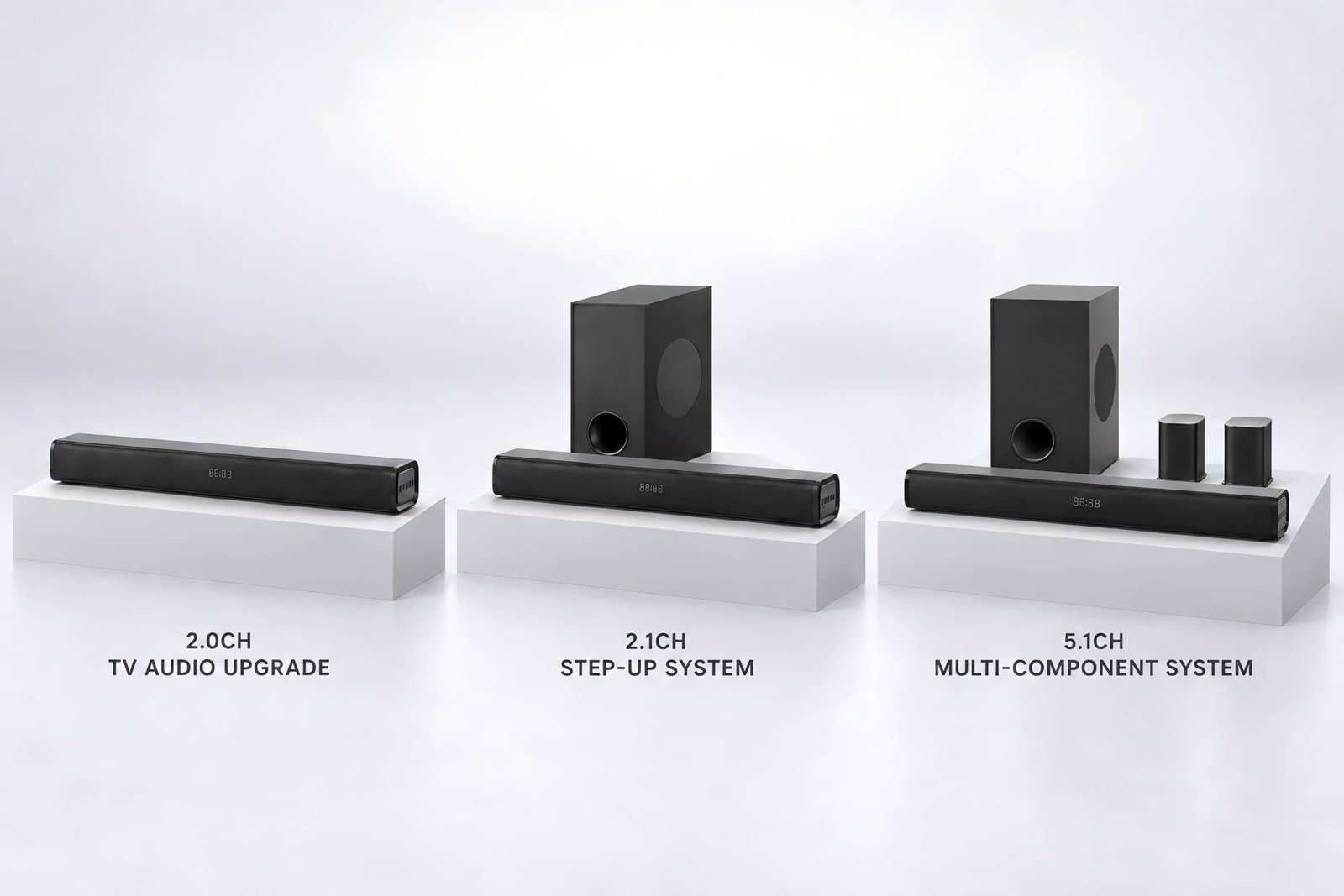
When a distributor builds a three-model soundbar range, the hardest part is often not finding enough products.
It is making sure each product has a clear job.
If two soundbars compete for the same user, the same price position and the same retail story, adding both may create more complexity without giving the channel a stronger range. The useful starting point is therefore not the number of models available. It is a range-planning question:
What job does each soundbar perform in the assortment?
Give Every SKU a Clear Role
A soundbar earns its place in a range when the sales team can explain why it exists and when a customer should choose it.
One model might provide a straightforward television-audio upgrade with a simple physical setup. Another might make the low-frequency system more visible through a separate subwoofer. A third might serve a buyer who accepts a more involved, multi-component installation.
The point is not that a range must follow this exact sequence. The point is that each SKU needs a distinct reason to exist.
That role should be written before detailed model comparison begins. A short role statement can define the intended user, setup, channel and one clear system value.
If two products produce nearly identical role statements, the range may be carrying duplication rather than useful choice.
Match the Range to the Sales Channel
The same assortment will not work equally well in every channel.
In physical retail, the differences among products need to be visible from the display and explainable by staff. A system with additional components may create a clearer visual distinction, but it also requires more display space and a longer explanation.
If the full system stays inside the carton, the store may struggle to show why the product belongs in the range.
In e-commerce, the product page must carry that explanation. Images need to show the complete system, dimensions, connection points, controls and included accessories.
If two products look almost identical online, a longer feature table may not create a meaningful reason to step up.
For distributors, the assortment also affects training, quotation work, spare-part planning and after-sales support. Every additional configuration creates information that the sales and operations teams must keep accurate.
The range should therefore match not only what the channel can sell, but also what it can explain and support consistently.
Make the Step-Up Logic Visible
A buyer should be able to understand why one product sits next to another in the assortment.
The difference might be a simpler installation, a different system format, a clearly different use case or a more involved component setup.
Whatever the reason, it should be visible in the product role—not hidden inside several minor specification changes.
This does not require every SKU to look completely different. It requires each step to answer a different purchase situation.
When the only explanation is “this model has more features,” the range may be asking the channel to carry complexity without a stronger commercial story.
Use Architecture as One Selection Filter
System architecture helps define the product role, but it should not take over the entire assortment decision.
A one-bar product, a soundbar with a separate subwoofer and a multi-component system create different setup, display and support requirements.
Channel labels such as 2.1CH or 5.1CH do not explain those differences by themselves, and they do not prove performance or suitability.
For a focused comparison of these architectures, see 2.1CH vs 5.1CH Soundbars: What B2B Buyers Should Consider.
At range-planning level, the key question is simpler:
Does this architecture give the SKU a clear role that the intended channel can present and support?
Check Connectivity Against Intended Sources
Connectivity should follow the intended source devices and use case.
A television-led product may require HDMI ARC and optical input. A desktop or gaming product may need a different connection path. A product intended for markets with older televisions may need an appropriate fallback.
The goal is not to collect inputs. It is to make sure the product connects to the sources its role requires.
The exact input behavior must still be checked on the proposed version. A port shown in a specification does not establish compatibility with every television, computer or console.
Use Packaging, Logistics and Support as Commercial Filters
A product can fit the assortment on paper and still create an impractical commercial system.
Additional components affect carton size, internal protection, loading efficiency, accessory control and handling.
Different plug requirements, manual languages, remote-control batteries and wall-mount parts add version-management work. A system that needs more setup explanation may also require stronger sales training and after-sales support.
These factors should not replace the customer proposition, but they can determine whether the proposition is workable at the intended price position and scale.
Using shipment space efficiently only matters if the packaging still protects the product and the complete offer can be handled as planned.
Define What Must Be Verified Before Committing the Range
Before the assortment is confirmed, each proposed SKU should have an agreed verification scope.
The team may need to confirm the complete connection flow, source switching, controls, included accessories, physical dimensions, packaging, labeling and the sound target associated with the product role.
Claims about output, decoding, wireless behavior or compatibility should be tied to evidence for the exact version.
The commercial file should also contain the information that product, sales, operations and content teams will need later:
- approved images and dimensions
- confirmed accessories
- packaging data
- manual and label requirements
- relevant compliance evidence
- the agreed customization scope
This is not paperwork added after product selection.
It is how the business makes sure the range it chose can be sold, shipped and supported from one consistent version of the truth.
A Practical Decision Principle
A good soundbar range is not built by collecting more models.
It is built by giving each product a clear job.
Define the role, channel and intended setup first. Then use architecture, connectivity, logistics, support requirements and product-level evidence to decide whether the SKU strengthens the assortment—or simply adds another similar option.
FAQ
How many soundbar models should a distributor include in a range?
There is no universal number.
The range should be large enough to cover distinct user, channel or setup needs, but not so large that several models compete for the same role.
Each SKU should have a clear reason to exist.
Does every soundbar in the range need a different architecture?
Not necessarily.
Products can share an architecture if they serve different, explainable roles.
The important point is that the difference should be meaningful to the channel and supported by the complete product proposition—not created only through minor specification changes.
When should 2.1CH and 5.1CH architecture be compared?
Compare architecture after the intended product role and setup are clear.
A channel-count label does not establish suitability or performance on its own.
For the detailed architecture comparison, see 2.1CH vs 5.1CH Soundbars: What B2B Buyers Should Consider.
Planning a soundbar assortment for a distribution, retail or private-label channel?
ARVICKA Sound can help map the role of each SKU, identify unnecessary overlap and define the product and evidence requirements before model selection begins.